> For the complete documentation index, see [llms.txt](https://academy.any2info.com/any2info-academy/llms.txt). Markdown versions of documentation pages are available by appending `.md` to page URLs; this page is available as [Markdown](https://academy.any2info.com/any2info-academy/no-code-platform/management/authorization-structure.md).
# Authorization structure
**Category:** Management
**Version:** 1.0
**Last Updated:** March 02, 2026
**Author:** Any2Info
***
### Description
The **Authorization structure** is used to determine which users can see which forms within a collection.
It uses a **tree structure** to define visibility. The structure works **bottom-up**, meaning visibility increases as you move up the hierarchy.
An authorization structure can be reused across multiple forms. If multiple forms share the same authorization logic, only one authorization structure needs to be created.
Authorization structures can be created and managed in: Management → Authorization structure
***
### How It Works
#### Tree-Based Visibility
An authorization structure always contains:
* **One root node** (this is the name of the authorization structure)
* Child nodes below the root
* A strict hierarchical tree (only one root per structure)
***
#### Visibility Rules
**Lowest Level (Leaf Nodes)**
Users in the lowest node:
* ✅ See forms assigned to themselves (The creator is the default assignee)
* ❌ Do NOT see forms of users in the same node
* ❌ Do NOT see forms of users in sibling nodes
Users in the same node do **not** see each other’s forms.
***
**Parent Nodes**
Users in a higher-level node:
* ✅ See their own forms
* ✅ See forms of users in all child nodes below (recursive)
Visibility flows **upward** in the tree.
***
#### Multiple Node Membership
A user can be added to multiple nodes.
If a user exists in multiple nodes:
* Their visibility is the **combined result**
* There is **no conflict resolution**
* All visible users are merged together
***
#### User Groups
Not only individual users can be added to a node, but also **user groups**.
If a user group is added:
* All members inherit the node’s permissions
* This is **dynamic**
* If a user leaves the group, their permissions are automatically removed
* If a user is added to the group, they automatically inherit the permissions
***
### Roles Within the Authorization Structure
A node can be assigned a **role**.
Roles are defined within the platform and determine what a user is allowed to do (for example: access dashboards, forms, AI agents).
Example:
* Role: `Employees`
* Role: `Employees with expense option`
The role determines:
* Whether a user can create or use certain forms
The authorization structure determines:
* Whose forms a user can see
Example:
* A user may have the right to fill out an **Expense form**
* The authorization structure determines whose expenses they can view
All users in the node and its child nodes automatically inherit the assigned role.
***
### Variables
Authorization structure nodes can define **collection variables**.
Instead of assigning a variable to individual users, the variable can be assigned at node level.
***
#### Inheritance Rules
* Variables are inherited **downwards**
* The value of the **closest node wins**
Example:
* Level 1 sets Variable = A
* Level 3 sets Variable = B
* A user in Level 4 → gets value **B**
* A user in Level 2 → gets value **A**
If:
* Only Level 3 has a value
* A user is in Level 2
Then:
* The user does **not** receive a value
* Inheritance only works upward to the nearest ancestor with a value
***
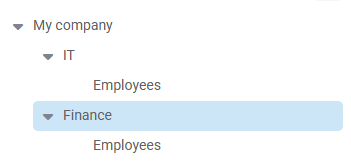
### Example Structure
Example hierarchy:
* CEO (top level)
* Departments (second level)
* Employees (third level)
In this scenario:
* The CEO sees all forms
* Department managers see all forms within their department
* Employees only see their own forms
Sample structure:
***
### Using Authorization Structures in Forms
A form can have **one** authorization method.
Available authorization methods:
1. **None**\
→ Everybody sees everything.
2. **Personal**\
→ Everybody only sees their own forms.
3. **Authorization structure**\
→ A structure must be selected from a dropdown.\
→ Visibility is determined by the selected structure.
4. **Manager**\
→ Users see:
* Their own forms
* Forms of users for whom they are registered as manager
If no authorization structure is selected (when using "None"), everyone sees all forms.
***
### Reusability
* A collection can contain multiple authorization structures.
* A form can only have **one** authorization structure.
* Authorization structures can be reused across multiple forms.
* Authorization structures can be edited after being linked to forms.
Changes apply immediately once a form is saved.
***
### Changelog
| **Version** | **Date** | **Change** |
| ----------- | -------------- | -------------------------------- |
| 1.0 | March 02, 2026 | Initial document & documentation |
---
# Agent Instructions
This documentation is published with GitBook. GitBook is the documentation platform designed so that both humans and AI agents can read, navigate, and reason over technical content effectively. Learn more at gitbook.com.
## Querying This Documentation
If you need additional information that is not directly available in this page, you can query the documentation by asking a question.
Perform an HTTP GET request on the following URL with the `ask` and `goal` query parameters:
```
GET https://academy.any2info.com/any2info-academy/no-code-platform/management/authorization-structure.md?ask=&goal=
```
`ask` is the immediate question: it should be specific, self-contained, and written in natural language.
`goal` is what the user is ultimately trying to achieve, the reason they need the answer. Sharing it helps GitBook give you a better, more relevant answer. A goal is most helpful when it describes the outcome the user wants rather than restating the question. For example, with `ask=how do I create an API token`, a goal like `automate deployments from our CI pipeline` lets GitBook tailor the answer to that use case.
The response will contain a direct answer to the question and relevant excerpts and sources from the documentation.
Use this mechanism when the answer is not explicitly present in the current page, you need clarification or additional context, or you want to retrieve related documentation sections.