> For the complete documentation index, see [llms.txt](https://academy.any2info.com/any2info-academy/llms.txt). Markdown versions of documentation pages are available by appending `.md` to page URLs; this page is available as [Markdown](https://academy.any2info.com/any2info-academy/no-code-platform/app-studio/application-design/forms/fields-toolbox/basics/masked-textbox.md).
# Masked textbox
**Category:** Field
**Version:** 1.0
**Last Updated:** November 19, 2025
**Author:** Any2Info
***
### **Description**
The **MaskedTextbox** field allows users to enter text, numbers, or symbols in a **predefined format** set by the form creator.
It appears as a standard textbox with **placeholder values** that visually represent the **mask structure**.
This field is ideal when input must follow a specific format — for example, a **postal code**, **phone number**, or **email address**.
***
### **General Properties**
The MaskedTextbox field inherits all [**general field properties**](https://www.notion.so/MaskedTextbox-Field-2a2ea901b1b880d6a736d7ca5c2887e1?pvs=21) such as:
* Font size
* Font color
* Border color
*(If general field properties are documented elsewhere, link to that page instead.)*
***
### **Special Properties**
The MaskedTextbox field includes two special properties:
| **Property** | **Description** |
| --------------------------- | ------------------------------------------------------------- |
| **Type** *(Simple / Email)* | Defines the behavior of the MaskedTextbox. |
| **Mask** | A pattern of characters that determines which input is valid. |
#### **Type**
* **Simple** – Uses the specified Mask for input validation.
* **Email** – Ignores the Mask and enforces standard email formatting rules.
#### **Mask**
A Mask defines the structure of the input and can contain the following characters:
| **Character** | **Meaning** |
| ------------- | ----------------------------------------------------------- |
| `0` | Required digit (0–9) |
| `9` | Optional digit or space |
| `#` | Digit or space (optional), allows `+` or `-` |
| `L` | Required letter (`a`–`z` or `A`–`Z`) |
| `C` | Optional letter or space |
| `A` | Required alphanumeric character (`a`–`z`, `A`–`Z`, `0`–`9`) |
| `a` | Optional alphanumeric character |
> Note:
>
> The **Mask** property only applies when **Type = Simple**.
>
> When **Type = Email**, the mask is ignored.
***
### **Tips & Best Practices**
* **Don’t create your own email mask.** Use the predefined Email type — it automatically enforces correct formatting.
* **Be intentional about allowed input.** Optional mask characters (like `a`) can lead to incomplete input (e.g., `1234` instead of `1234AA` for a postal code).
* **Provide clear instructions** to users if your mask enforces strict patterns.
***
### **Errors**
| **Error Message** | **Meaning** | **Solution** |
| -------------------------------------------- | -------------------------------------------------- | ------------------------------------------------------------ |
| *The input value does not match the format.* | The user’s input does not follow the defined mask. | Adjust the mask or clarify the expected format for the user. |
***
### **Examples**
#### **Simple Mask**
In the following example, the user must enter **four digits (0–9)** followed by **two required letters** (A–Z or a–z).
**Valid examples:**
`0000AA`, `1234Jl`, `4065aa`
**Invalid example:**
`0000a_` (second letter missing)
***
#### **Email Mask**
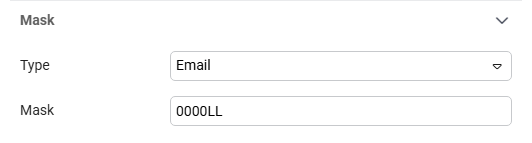
In this example, the **Type** is set to **Email** and a **Mask** is also defined.
Since the **Email** type takes precedence, the mask is ignored — only valid email addresses are accepted.
***
### **Changelog**
| **Version** | **Date** | **Change** |
| ----------- | ----------------- | ------------------------------------ |
| 1.0 | November 19, 2025 | Initial documentation version added. |
---
# Agent Instructions
This documentation is published with GitBook. GitBook is the documentation platform designed so that both humans and AI agents can read, navigate, and reason over technical content effectively. Learn more at gitbook.com.
## Querying This Documentation
If you need additional information that is not directly available in this page, you can query the documentation by asking a question.
Perform an HTTP GET request on the following URL with the `ask` and `goal` query parameters:
```
GET https://academy.any2info.com/any2info-academy/no-code-platform/app-studio/application-design/forms/fields-toolbox/basics/masked-textbox.md?ask=&goal=
```
`ask` is the immediate question: it should be specific, self-contained, and written in natural language.
`goal` is what the user is ultimately trying to achieve, the reason they need the answer. Sharing it helps GitBook give you a better, more relevant answer. A goal is most helpful when it describes the outcome the user wants rather than restating the question. For example, with `ask=how do I create an API token`, a goal like `automate deployments from our CI pipeline` lets GitBook tailor the answer to that use case.
The response will contain a direct answer to the question and relevant excerpts and sources from the documentation.
Use this mechanism when the answer is not explicitly present in the current page, you need clarification or additional context, or you want to retrieve related documentation sections.